
Layout specifiers in c program language period are placeholders utilized in format strings inside functions like printf() and scanf() to specify the kind and layout of the data being processed. They tell the capabilities a way to interpret and format the input/output statistics. right here’s an evidence of normally used layout specifiers:
Format specifiers are places that tell where and how data should be written or read. It allows developers to control the appearance of data in the output and ensure correct interpretation of input data.
Common type specifiers in the printf() function are:
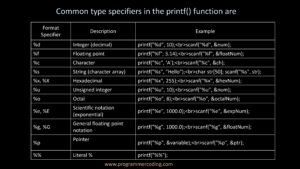
• %d: Used to print integer values in decimal format.
Example
int num = 10;
printf(“The value of num is: %d\n”, num);
Output
The value of num is: 10
• %f: Used to print floating points (floats and doubles).
Example
float pi = 3.14159;
printf(“The value of pi is: %f\n”, pi);
Output
The value of pi is: 3.141590
• %c: Used to print characters.
Example
char letter = ‘A’;
printf(“The character is: %c\n”, letter);
Output
The character is: A
• %s: Used to print strings (null-terminated character arrays).
Example
char greeting[] = “programmercoding.com”;
printf(“The greeting is: %s\n”, greeting);
Output
The greeting is: programmercoding.com
• %x or %X: Used to print integers in hexadecimal format (lowercase or uppercase).
Example
int hexNumber = 255;
printf(“Hexadecimal value: %x\n”, hexNumber);
Output
Hexadecimal value: ff
• %u: Used to print unsigned integers.
Example
unsigned int positiveNumber = 20;
printf(“Unsigned number: %u\n”, positiveNumber);
Output
Unsigned number: 20
• %o: Used to print integers in octal format.
Example
int octalNumber = 8;
printf(“Octal value: %o\n”, octalNumber);
Output
Octal value: 10
• %e or %E: Used to print floating-point values in scientific notation (exponential format).
Example
double num = 12345.6789;
printf(“Scientific notation (lowercase): %e\n”, num);
printf(“Scientific notation (uppercase): %E\n”, num);
Output
Scientific notation (lowercase): 1.234568e+04
Scientific notation (uppercase): 1.234568E+04
• %g or %G: Used to print floating-point values in either normal or exponential notation, depending on the value and precision.
Example
float num1 = 12345.6789;
float num2 = 0.0000123456789;
printf(“Floating-point number (lowercase): %g\n”, num1);
printf(“Floating-point number (uppercase): %G\n”, num2);
Output
Floating-point number (lowercase): 12345.7
Floating-point number (uppercase): 1.23457E-05
• %%: Used to print a literal percent sign.
Example
printf(“Print a percent sign: %%\n”);
Output
Print a percent sign: %
Example
#include <stdio.h>
int main() {
int integerNumber = 10;
float floatNumber = 3.14159;
char character = ‘A’;
char string[] = “programmercoding.com!”;
int hexNumber = 255;
unsigned int unsignedNumber = 20;
int octalNumber = 8;
// Printing integer value
printf(“Integer: %d\n”, integerNumber);
// Printing floating-point value
printf(“Float: %f\n”, floatNumber);
// Printing character
printf(“Character: %c\n”, character);
// Printing string
printf(“String: %s\n”, string);
// Printing hexadecimal number
printf(“Hexadecimal: %x\n”, hexNumber);
// Printing unsigned integer
printf(“Unsigned Integer: %u\n”, unsignedNumber);
// Printing octal number
printf(“Octal: %o\n”, octalNumber);
return 0;
}
Output
Integer: 10
Float: 3.141590
Character: A
String: programmercoding.com!
Hexadecimal: ff
Unsigned Integer: 20
Octal: 10